
Lovegotchi guide
Getting started with Lovegotchi
From download to your first hatched egg — everything you and your partner (or best friend) need to know to get going.
Lovegotchi is a shared virtual pet game: two people, two phones, one Mochi. Setting it up takes a couple of minutes. Here’s the whole process, step by step.
Step 1: Both of you install the app
Lovegotchi is free on Google Play for Android phones. Each person installs it on their own phone — you’ll each have your own account, connected to a shared home.
Step 2: Sign in
Sign in with your Google account or with an email and password. Pick a display name your partner will recognize.
Step 3: One of you creates Mochi
On the “Meet your Mochi” screen, one person taps Create my Mochi. This creates your shared home and your egg. You’ll see a “Mochi is ready!” screen with a 6-character partner code.
Tap Invite my partner to share the code through any messaging app, or copy it and send it however you like.
Step 4: The other person joins
The second person taps I have a partner code, types in the 6 characters, and taps Join our home. That’s it — you’re paired. From now on you both see the same Mochi, the same room, and the same private space.
Tip: only one of you should tap “Create my Mochi.” If you both create one, you’ll end up with two separate homes instead of one shared one.
Step 5: Hatch your egg
Every Mochi starts as an egg. Care for it together to earn experience; once your shared level reaches 3, the egg hatches in a little ceremony and you meet Baby Mochi.

Step 6: Learn the care buttons
The home screen shows Mochi in her room with seven care buttons underneath: Feed, Play, Cuddle, Sleep, Rest, Bathe, and Talk. Each one helps a different need and has a short cooldown. A small message pops up to tell you how Mochi liked it — and how many coins you earned.
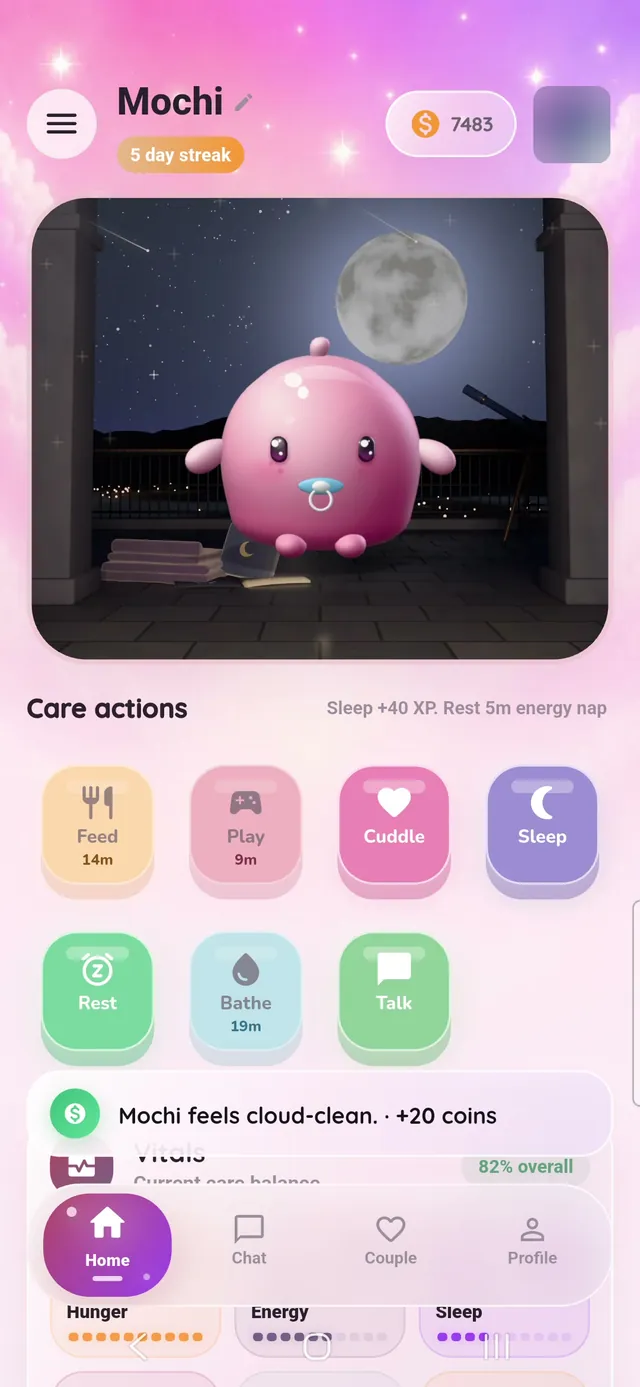
Our care guide explains what each action does.
Step 7: Explore the rest of your shared space
- Couple tab: your streak, days together, anniversary countdown, and achievements.
- Chat: a private chat just for the two of you, with photos, stickers, and reactions.
- Memory Vault and journal: save photos and notes, and write longer entries together.
- Evolution Tree: see Mochi’s current stage and what’s next.
- Shop: spend coins on skins, hats, and rooms.
Step 8: Optional extras
- Home-screen widget: add the Lovegotchi widget to see how Mochi is doing at a glance.
- Reminders: turn on gentle notifications when Mochi needs care, with quiet hours for when you sleep.
- Daily check-in: visit the Daily Bonuses Center for check-in rewards.
Common questions
Do we need to play at the same time?
No. Care is asynchronous — whatever one of you does is there for the other to see later.
Can three people share a Mochi?
No. A Lovegotchi home is always exactly two people.
Is there an iPhone version?
Not right now. Lovegotchi is currently available on Android through Google Play.
Keep reading

A guide to Lovegotchi’s skins, hats, and rooms
Every way to customize Mochi in Lovegotchi: 3D skins like Honey, Strawberry and Stormlight, hats and charms, and all 16 rooms — plus how to unlock them.
Read the article →
How streaks work in Lovegotchi
How Lovegotchi’s shared streak counts days, what breaks it, how the streak saver works, and gentle ways to keep a streak going together.
Read the article →
How to care for your Mochi
What Feed, Play, Cuddle, Sleep, Rest, Bathe and Talk do in Lovegotchi, their cooldowns, what Mochi’s moods mean, and how to keep her happy together.
Read the article →